介绍
该文大多数内容主要为转载,文章结尾附带个人实战部分。
说明:经验部分为去年的这段时间实战出来的,现遇到同样的问题发现需要重新排查,故重新整理后发布到博客以作备份梳理。
【转载】
感谢用户 hoochanlon 贡献的大部分技术支持,以下两篇重要的组成帖子《批处理设置IE主页、可信任级别安全页选项、兼容视图、防Edge劫持》,《【batch&powershell】解决IE相关网站兼容及显示、点击按钮无响应等问题方案》
批处理设置IE主页、可信任级别安全页选项、兼容视图、防Edge劫持
文章来源: https://www.52pojie.cn/thread-1765347-1-1.html
序
由于企业的日常办公及业务需要,基本上是离不开IE的。这些企业内网系统、政府及银行网站都需要在IE里进行特别设置,才能保证正常稳定运行。在企业有众多各有所长的人,不懂电脑的也是相当多的;有时候在同一时间段会有多个同事找你处理问题,问题虽说简单,但操作繁琐,也很耽误自己的时间。做过桌面或网管的朋友,应该是有过这方面体会的。
解决途径有两个:一、将设置集成在封装系统镜像;二、写批处理脚本分发。
这个脚本花了我两天多的时间,主要是参考IE信任站点的“自定义级别”配置特别多,逐条查看巨耗时。大概有百来条策略配置是涉及内网环境办公业务的,比如:是否启用 MIME 探查(内网下载文档类型识别)、是否允许javascript脚本(涉及到打印)、是否允许重定向,等等。其实跟配置Linux云主机毛坯房的感受是一样的。
代码编写所用到的各类工具
核心参考站点
编码调试过程中遇到的主要问题
双环境IE11测试
- IE逐条添加IP可信任站点没问题,但无法删除(注册表可);字母域名站点则一切正常。
- 将IE配置策略应用到所有用户,在win11的IE上出现不能加入可信任站点的bug
- IE被edge多次劫持;死锁主页更改,在win11的IE已经不合时宜了。
问题处理办法:
- 问题1;由于是企业内网环境,删不掉IP站点,影响不大。
- 问题2;注释了设置SECURITY_HKLM_ONLY键值的代码。
- 问题3;注释死锁主页代码;修改IEtoEdge项键值与IE第三方扩展项键值。
win7的IE11与win11 IE11的区别仅在于主页修改有GUI,其他各项基本上是一致的。
关于小鱼儿win11 IE修复工具,网上好评不错。请求管理员权限什么中规中矩,没有植入主页其他的注入信息。大家也可以用IDA、RH这类反编译工具来折腾折腾,也可以做后续深入研究。
附源码说明
代码特别长,是因为我看完了admx.help -【安全页 受信任的站点区域】的所有项,根据我自己的内网环境做的考量设置,这也就是耗时两天多的原因。简单的话,可以只保留以下区域安全级别的设置,并关闭注释。
1
2
3
4
5
6
7
|
reg add "HKCU\Software\Microsoft\Windows\CurrentVersion\Internet Settings\Zones\2" /v "CurrentLevel" /t REG_DWORD /d 0x10000 /f
reg add "HKCU\Software\Microsoft\Windows\CurrentVersion\Internet Settings\Zones\1" /v "CurrentLevel" /t REG_DWORD /d 0x10000 /f
|
注意要点:
- 使用git仓里的代码,记得转成GB2312格式。
- 使用时注意仔细看我对代码的注释说明。
- 脚本面向受众:网管、桌面、装机工程师等特殊人群使用,不适合普通大众用户使用。
https://github.com/hoochanlon/ihs-simple/blob/main/d-bat/saigonoie.bat
1
2
3
4
5
6
7
8
9
10
11
12
13
14
15
16
17
18
19
20
21
22
23
24
25
26
27
28
29
30
31
32
33
34
35
36
37
38
39
40
41
42
43
44
45
46
47
48
49
50
51
52
53
54
55
56
57
58
59
60
61
62
63
64
65
66
67
68
69
70
71
72
73
74
75
76
77
78
79
80
81
82
83
84
85
86
87
88
89
90
91
92
93
94
95
96
97
98
99
100
101
102
103
104
105
106
107
108
109
110
111
112
113
114
115
116
117
118
119
120
121
122
123
124
125
126
127
128
129
130
131
132
133
134
135
136
137
138
139
140
141
142
143
144
145
146
147
148
149
150
151
152
153
154
155
156
157
158
159
160
161
162
163
164
165
166
167
168
169
170
171
172
173
174
175
176
177
178
179
180
181
182
183
184
185
186
187
188
189
190
191
192
193
194
195
196
197
198
199
200
201
202
203
204
205
206
207
208
209
210
211
212
213
214
215
216
217
218
219
220
221
222
223
224
225
226
227
228
229
230
231
232
233
234
235
236
237
238
239
240
241
242
243
244
245
246
247
248
249
250
251
252
253
254
255
256
257
258
259
260
261
262
263
264
265
266
267
268
269
270
271
272
273
274
275
276
277
278
279
280
281
282
283
284
285
286
287
288
289
290
291
292
293
294
295
296
297
298
299
300
301
302
303
304
305
306
307
308
309
310
311
312
313
|
@ECHO off
%1 C:\Windows\SysWOW64\mshta.exe vbscript:CreateObject("Shell.Application").ShellExecute("cmd.exe","/c %~s0 ::","","runas",1)(window.close)&&exit
cd /d "%~dp0"
reg add "HKEY_LOCAL_MACHINE\SOFTWARE\Microsoft\Windows\CurrentVersion\Policies\System" /v "EnableLUA" /t REG_DWORD /d 0 /f
reg add "HKEY_CURRENT_USER\Software\Microsoft\Internet Explorer\BrowserEmulation" /v "AllSitesCompatibilityMode" /t REG_DWORD /d 1 /f
reg add "HKEY_CURRENT_USER\Software\Microsoft\Internet Explorer\Main" /v "Start Page" /t REG_SZ /d www.baidu.com /f
reg add "HKEY_CURRENT_USER\Software\Microsoft\Internet Explorer\Main" /v "Enable Browser Extensions" /t REG_SZ /d "NO" /f
reg add "HKCU\Software\Microsoft\Edge\IEToEdge" /v "UpsellDisabled" /t REG_DWORD /d 0 /f
reg add "HKCU\Software\Microsoft\Edge\IEToEdge" /v "RedirectionMode" /t REG_DWORD /d 0 /f
reg add "HKCU\Software\Microsoft\Edge\IEToEdge" /v "QuietExpirationTime" /t REG_QWORD /d 0 /f
reg add "HKEY_CURRENT_USER\Software\Microsoft\Windows\CurrentVersion\Internet Settings\ZoneMap\Domains\192.168.0.1" /v http /t REG_DWORD /d 0x00000002 /f
reg add "HKEY_CURRENT_USER\Software\Microsoft\Windows\CurrentVersion\Internet Settings\ZoneMap\Domains\192.168.0.2" /v http /t REG_DWORD /d 0x00000002 /f
reg add "HKEY_CURRENT_USER\Software\Microsoft\Windows\CurrentVersion\Internet Settings\ZoneMap\Domains\192.168.0.3" /v https /t REG_DWORD /d 0x00000002 /f
reg add "HKEY_CURRENT_USER\Software\Microsoft\Windows\CurrentVersion\Internet Settings\ZoneMap\Domains\baidu.com\www" /v http /t REG_DWORD /d 0x00000002 /f
reg add "HKEY_CURRENT_USER\Software\Microsoft\Windows\CurrentVersion\Internet Settings\ZoneMap\Domains\bing.com\www" /v https /t REG_DWORD /d 0x00000002 /f
reg add "HKCU\Software\Microsoft\Windows\CurrentVersion\Internet Settings\Zones\2" /v "Flags" /t REG_DWORD /d 0x00047 /f
:: https://admx.help/?Category=InternetExplorer&Policy=Microsoft.Policies.InternetExplorer::IZ_Policy_TurnOnProtectedMode_9&Language=zh-cn
:: https://admx.help/?Category=InternetExplorer&Policy=Microsoft.Policies.InternetExplorer::IZ_PolicyTrustedSitesZoneTemplate&Language=zh-cn
reg add "HKCU\Software\Microsoft\Windows\CurrentVersion\Internet Settings\Zones\2" /v "2201" /t REG_DWORD /d 0 /f
reg add "HKCU\Software\Microsoft\Windows\CurrentVersion\Internet Settings\Zones\2" /v "1402" /t REG_DWORD /d 0 /f
reg add "HKCU\Software\Microsoft\Windows\CurrentVersion\Internet Settings\Zones\2" /v "1001" /t REG_DWORD /d 0 /f
reg add "HKCU\Software\Microsoft\Windows\CurrentVersion\Internet Settings\Zones\2" /v "1004" /t REG_DWORD /d 1 /f
reg add "HKCU\Software\Microsoft\Windows\CurrentVersion\Internet Settings\Zones\2" /v "120B" /t REG_DWORD /d 0 /f
reg add "HKCU\Software\Microsoft\Windows\CurrentVersion\Internet Settings\Zones\2" /v "1809" /t REG_DWORD /d 3 /f
reg add "HKCU\Software\Microsoft\Windows\CurrentVersion\Internet Settings\Zones\2" /v "1206" /t REG_DWORD /d 0 /f
reg add "HKCU\Software\Microsoft\Windows\CurrentVersion\Internet Settings\Zones\2" /v "1608" /t REG_DWORD /d 0 /f
reg add "HKCU\Software\Microsoft\Windows\CurrentVersion\Internet Settings\Zones\2" /v "1209" /t REG_DWORD /d 0 /f
reg add "HKCU\Software\Microsoft\Windows\CurrentVersion\Internet Settings\Zones\2" /v "2000" /t REG_DWORD /d 0 /f
:: [百度百科-XAML](https://baike.baidu.com/item/XAML/6123952?fr=aladdin)
reg add "HKCU\Software\Microsoft\Windows\CurrentVersion\Internet Settings\Zones\2" /v "2402" /t REG_DWORD /d 0 /f
reg add "HKCU\Software\Microsoft\Windows\CurrentVersion\Internet Settings\Zones\2" /v "2400" /t REG_DWORD /d 0 /f
reg add "HKCU\Software\Microsoft\Windows\CurrentVersion\Internet Settings\Zones\2" /v "2401" /t REG_DWORD /d 0 /f
reg add "HKCU\Software\Microsoft\Windows\CurrentVersion\Internet Settings\Zones\2" /v "2708" /t REG_DWORD /d 3 /f
reg add "HKCU\Software\Microsoft\Windows\CurrentVersion\Internet Settings\Zones\2" /v "2709" /t REG_DWORD /d 3 /f
reg add "HKCU\Software\Microsoft\Windows\CurrentVersion\Internet Settings\Zones\2" /v "120A" /t REG_DWORD /d 3 /f
reg add "HKCU\Software\Microsoft\Windows\CurrentVersion\Internet Settings\Zones\2" /v "1604" /t REG_DWORD /d 0 /f
reg add "HKCU\Software\Microsoft\Windows\CurrentVersion\Internet Settings\Zones\2" /v "1800" /t REG_DWORD /d 1 /f
reg add "HKCU\Software\Microsoft\Windows\CurrentVersion\Internet Settings\Zones\2" /v "1802" /t REG_DWORD /d 0 /f
reg add "HKCU\Software\Microsoft\Windows\CurrentVersion\Internet Settings\Zones\2" /v "1803" /t REG_DWORD /d 0 /f
reg add "HKCU\Software\Microsoft\Windows\CurrentVersion\Internet Settings\Zones\2" /v "1400" /t REG_DWORD /d 0 /f
reg add "HKCU\Software\Microsoft\Windows\CurrentVersion\Internet Settings\Zones\2" /v "2102" /t REG_DWORD /d 0 /f
reg add "HKCU\Software\Microsoft\Windows\CurrentVersion\Internet Settings\Zones\2" /v "2105" /t REG_DWORD /d 0 /f
reg add "HKCU\Software\Microsoft\Windows\CurrentVersion\Internet Settings\Zones\2" /v "2104" /t REG_DWORD /d 0 /f
reg add "HKCU\Software\Microsoft\Windows\CurrentVersion\Internet Settings\Zones\2" /v "2300" /t REG_DWORD /d 1 /f
reg add "HKCU\Software\Microsoft\Windows\CurrentVersion\Internet Settings\Zones\2" /v "1407" /t REG_DWORD /d 0 /f
reg add "HKCU\Software\Microsoft\Windows\CurrentVersion\Internet Settings\Zones\2" /v "2103" /t REG_DWORD /d 0 /f
reg add "HKCU\Software\Microsoft\Windows\CurrentVersion\Internet Settings\Zones\2" /v "2600" /t REG_DWORD /d 0 /f
reg add "HKCU\Software\Microsoft\Windows\CurrentVersion\Internet Settings\Zones\2" /v "1208" /t REG_DWORD /d 0 /f
:: [Java获取文件的Mime类型的几种方式总结](https://backend.devrank.cn/traffic-information/7082116610194065421)
reg add "HKCU\Software\Microsoft\Windows\CurrentVersion\Internet Settings\Zones\2" /v "2100" /t REG_DWORD /d 0 /f
reg add "HKCU\Software\Microsoft\Windows\CurrentVersion\Internet Settings\Zones\2" /v "2301" /t REG_DWORD /d 3 /f
reg add "HKCU\Software\Microsoft\Windows\CurrentVersion\Internet Settings\Zones\2" /v "2500" /t REG_DWORD /d 3 /f
reg add "HKCU\Software\Microsoft\Windows\CurrentVersion\Internet Settings\Zones\2" /v "1409" /t REG_DWORD /d 3 /f
:: https://learn.microsoft.com/en-us/archive/blogs/ie_cn/ie10-release-preview-dx
reg add "HKCU\Software\Microsoft\Windows\CurrentVersion\Internet Settings\Zones\2" /v "270B" /t REG_DWORD /d 0 /f
reg add "HKCU\Software\Microsoft\Windows\CurrentVersion\Internet Settings\Zones\2" /v "1804" /t REG_DWORD /d 0 /f
reg add "HKCU\Software\Microsoft\Windows\CurrentVersion\Internet Settings\Zones\2" /v "2101" /t REG_DWORD /d 1 /f
reg add "HKCU\Software\Microsoft\Windows\CurrentVersion\Internet Settings\Zones\2" /v "1806" /t REG_DWORD /d 0 /f
reg add "HKCU\Software\Microsoft\Windows\CurrentVersion\Internet Settings\Zones\2" /v "1405" /t REG_DWORD /d 0 /f
reg add "HKCU\Software\Microsoft\Windows\CurrentVersion\Internet Settings\Zones\2" /v "1201" /t REG_DWORD /d 1 /f
reg add "HKCU\Software\Microsoft\Windows\CurrentVersion\Internet Settings\Zones\2" /v "1606" /t REG_DWORD /d 0 /f
reg add "HKCU\Software\Microsoft\Windows\CurrentVersion\Internet Settings\Zones\2" /v "1601" /t REG_DWORD /d 0 /f
reg add "HKCU\Software\Microsoft\Windows\CurrentVersion\Internet Settings\Zones\2" /v "2200" /t REG_DWORD /d 0 /f
:: 显示混合内容,**提示** 安全(https://)和不安全内容(http://)
reg add "HKCU\Software\Microsoft\Windows\CurrentVersion\Internet Settings\Zones\2" /v "1609" /t REG_DWORD /d 1 /f
reg add "HKCU\Software\Microsoft\Windows\CurrentVersion\Internet Settings\Zones\2" /v "1A04" /t REG_DWORD /d 0 /f
reg add "HKCU\Software\Microsoft\Windows\CurrentVersion\Internet Settings\Zones\2" /v "160A" /t REG_DWORD /d 0 /f
reg add "HKCU\Software\Microsoft\Windows\CurrentVersion\Internet Settings\Zones\2" /v "1A00" /t REG_DWORD /d 0 /f
reg add "HKCU\Software\Microsoft\Windows\CurrentVersion\Internet Settings\Zones\2" /v "270C" /t REG_DWORD /d 0 /f
reg add "HKCU\Software\Microsoft\Windows\CurrentVersion\Internet Settings\Zones\2" /v "1607" /t REG_DWORD /d 0 /f
reg add "HKCU\Software\Microsoft\Windows\CurrentVersion\Internet Settings\Zones\2" /v "1E05" /t REG_DWORD /d 0x030000 /f
reg add "HKCU\Software\Microsoft\Windows\CurrentVersion\Internet Settings\Zones\2" /v "1200" /t REG_DWORD /d 0 /f
reg add "HKCU\Software\Microsoft\Windows\CurrentVersion\Internet Settings\Zones\2" /v "2004" /t REG_DWORD /d 0 /f
reg add "HKCU\Software\Microsoft\Windows\CurrentVersion\Internet Settings\Zones\2" /v "2001" /t REG_DWORD /d 0 /f
reg add "HKCU\Software\Microsoft\Windows\CurrentVersion\Internet Settings\Zones\2" /v "1406" /t REG_DWORD /d 0 /f
reg add "HKCU\Software\Microsoft\Windows\CurrentVersion\Internet Settings\Zones\2" /v "1C00" /t REG_DWORD /d 0x030000 /f
:: 起先查阅的资料:[csdn-修改注册表来修改IE的设置资料汇总](https://blog.csdn.net/wangqiulin123456/article/details/17068649)
:: 微软官方已将旧版的IE文档资料删除了,不过还是找到了蛛丝马迹。对比如下两个文档,可以发现其端倪。
:: 估摸着微软当时是想做些什么设置,然后在"受信任的站点区域模板"板块,对这些保留项做了别有意味的定义
:: https://learn.microsoft.com/en-us/openspecs/windows_protocols/ms-gppref/c05dc3bf-dcfc-4f46-8be2-8a78e46875a7
:: [cnblogs-IE 11兼容性视图设置无法添加网站,提示“你输入了一个无效域”](https://www.cnblogs.com/xiykj/p/13603024.html)
ECHO "已关闭UAC,重启电脑将生效。"
pause
|
参考资料
特权提升:csdn-让bat批处理以管理员权限运行的实现方法
注册表导入写法考量:zhangshilong.cn-电脑时间服务器怎么设置,系统时间未与ntp服务器同步
核心参考站点
IE修改安全级别
IE重定向问题
IE兼容性视图
编码中途的学习了解过程
【batch&powershell】解决IE相关网站兼容及显示、点击按钮无响应等问题方案
前言
- 起因:财务无法点击登录进入保险网站做业务。
- 解决办法:运行保险网站提供的脚本。
- 产生的想法:
- 利用保险网站提供的现成脚本,改写成适合公司内部自己用的IE站点设置脚本
- 由此,必须根据网站地址,推测出兼容视图的hex。
这样的话,自己就能用现成脚本,结合相关的配置兼容视图站点代码,轻松应付很多IE站点出现的异常问题了。
IE兼容性视图hex值测试
通过chaoyuew - Windows Powershell进阶(43) 注册表操作之IE兼容性视图提供的源码,计算出网址的hex,通过如下指令植入注册表,添加兼容性视图站点是成立的。
1
| reg add "HKEY_CURRENT_USER\Software\Microsoft\Internet Explorer\BrowserEmulation\ClearableListData" /v "UserFilter" /t REG_BINARY /d
|
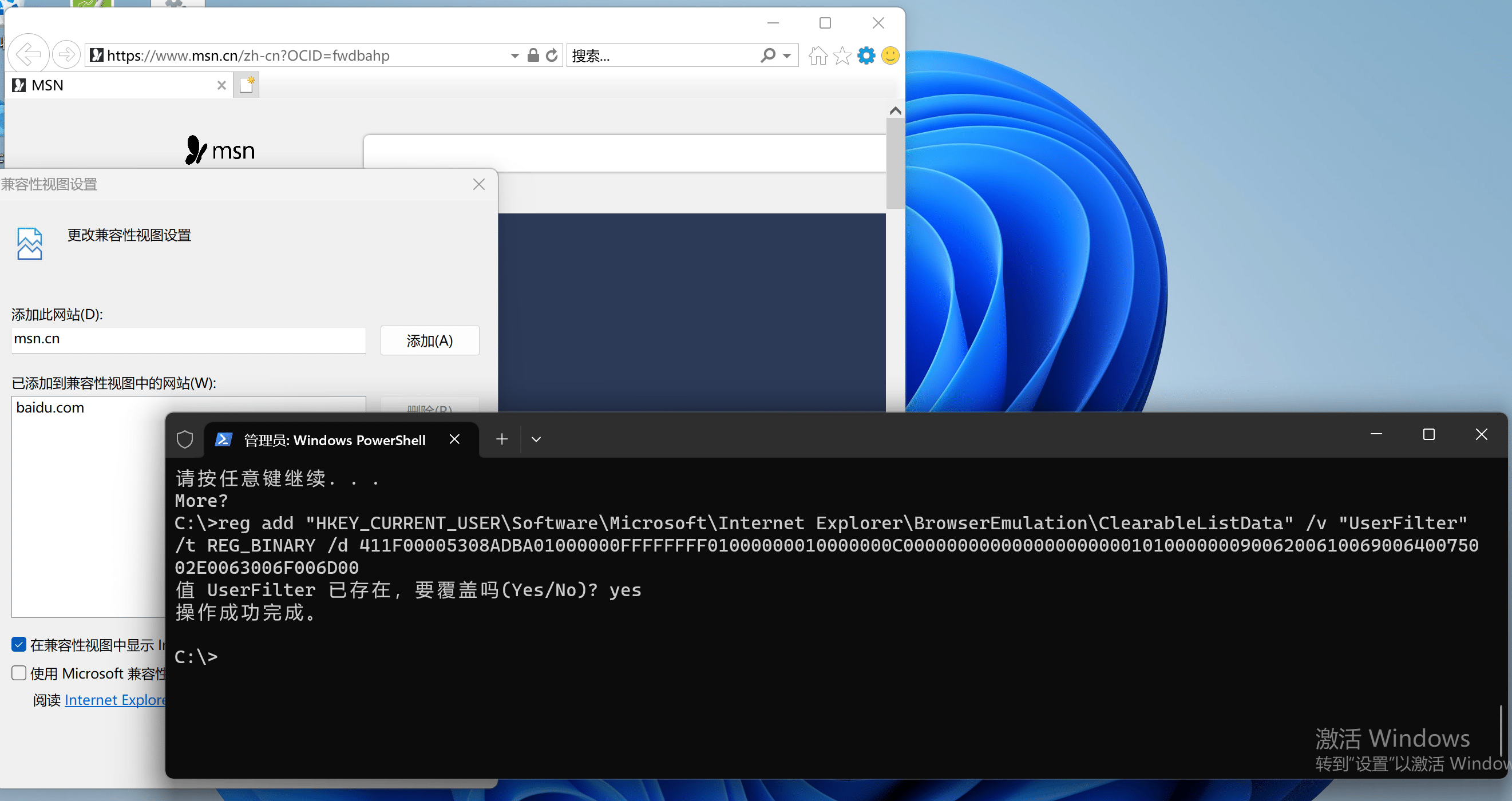
加入多个站点测试
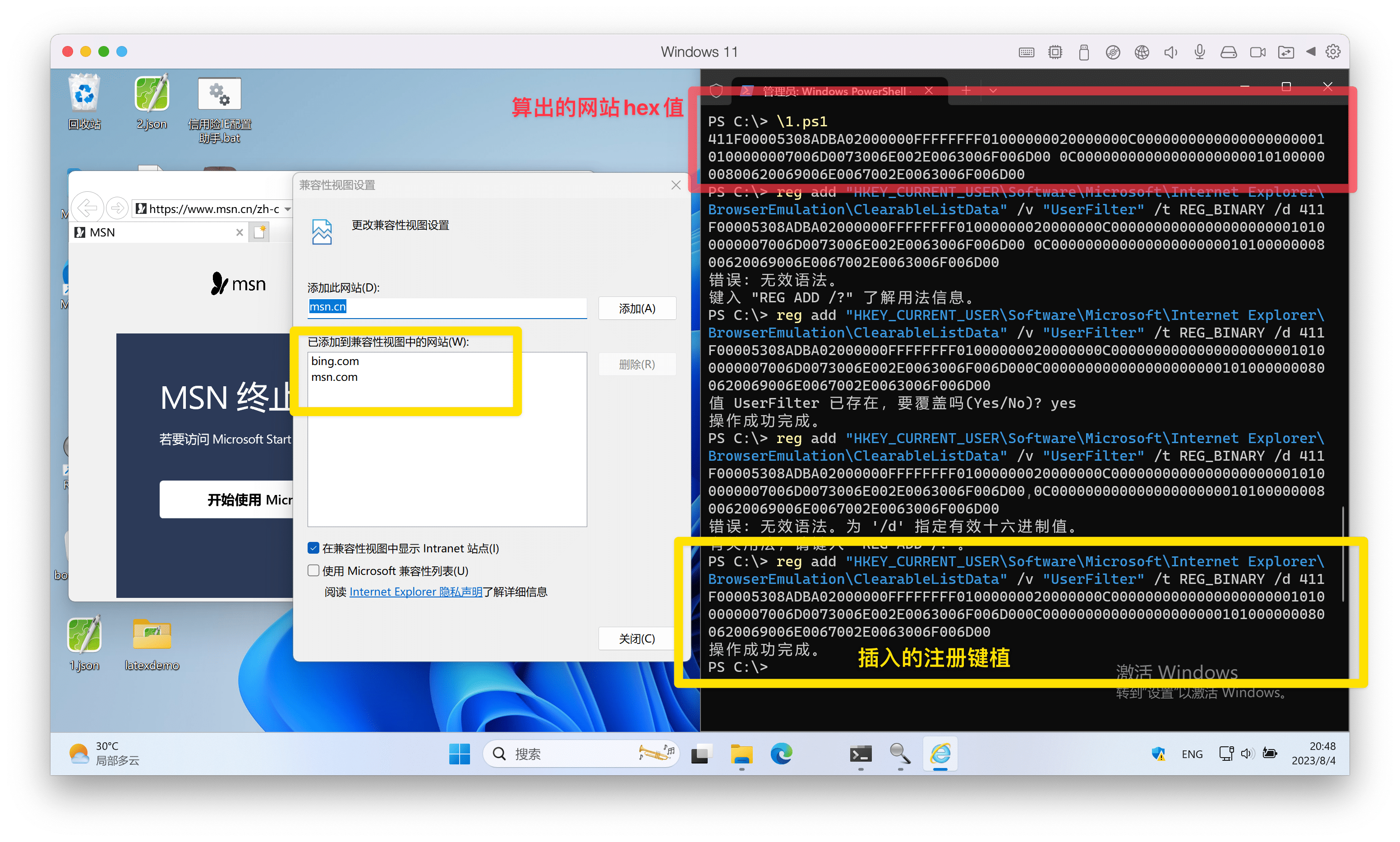
hex值需求分析
随时备着一份代码太麻烦了,要是能在线输入网址,并返回相应的hex结果就不错。或者
irm https://ghproxy.com/https://raw.githubusercontent.com/hoochanlon/scripts/main/d-pwsh/clac_ie_clearablelistdata_hex.ps1|iex
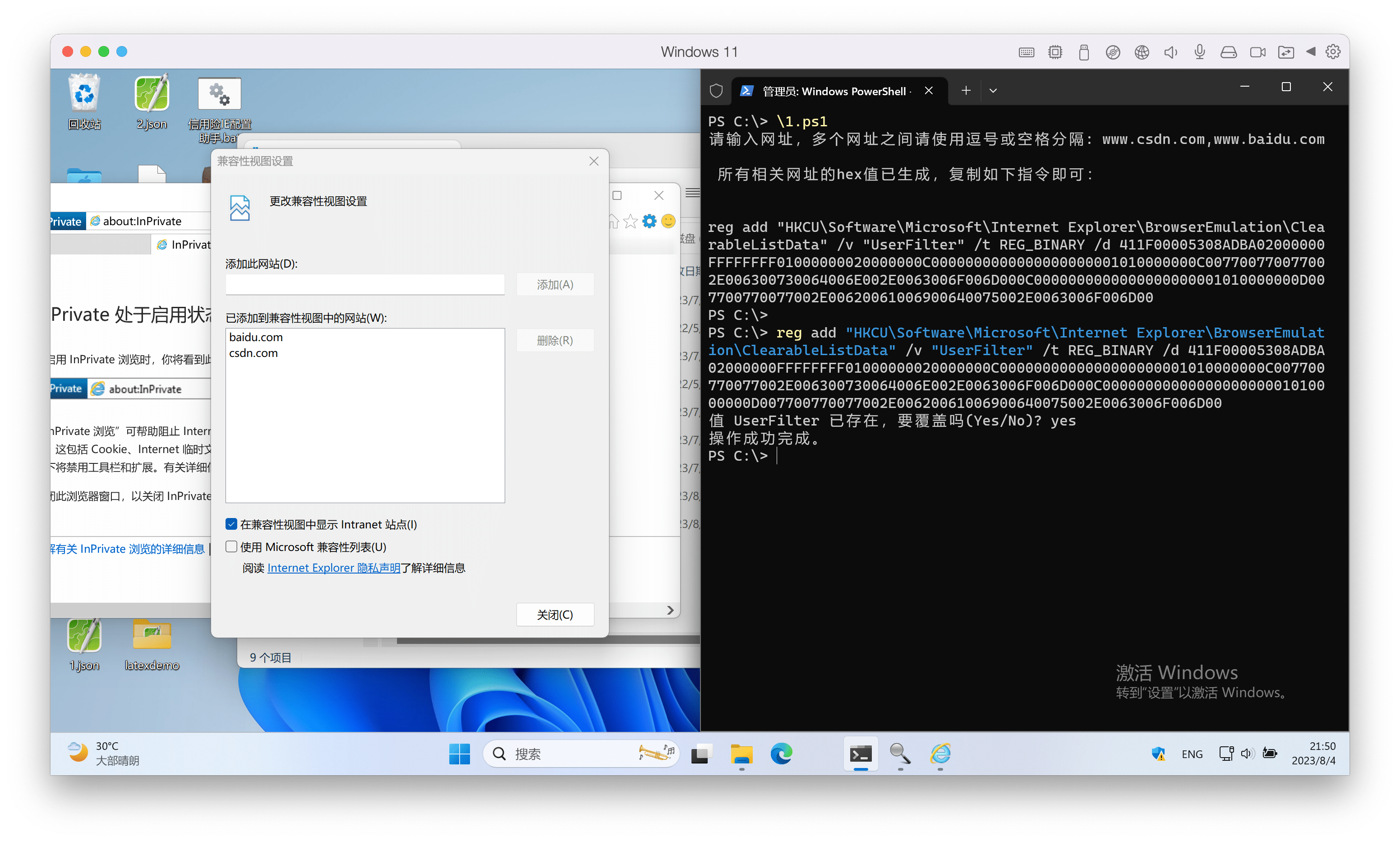
附源码
生成兼容视图代码+hex值配套
对chaoyuew - Windows Powershell进阶(43) 注册表操作之IE兼容性视图进行适应性改写,效果如上图。
代码地址:https://github.com/hoochanlon/scripts/blob/main/d-pwsh/clac_ie_clearablelistdata_hex.ps1
1
2
3
4
5
6
7
8
9
10
11
12
13
14
15
16
17
18
19
20
21
22
23
24
25
26
27
28
29
30
31
32
33
34
35
36
37
38
39
40
41
42
43
44
45
46
47
48
49
50
51
52
53
54
55
56
57
58
59
60
61
62
63
64
65
66
67
68
69
70
| # 使用说明
# 下载到本地使用,需转成 GB2312 编码,否则中文乱码
Function Get-WebsiteHex(){
[CmdletBinding()]
param(
[Parameter(Mandatory=$True)]
[string]$website
)
# 去除网址中的 https:// 和 http:// 前缀
$website = $website -replace "https?://", ""
# 去除斜杠后的所有内容
$website = $website -replace "/.*"
# 计算网站名称的十六进制长度
$hex_length = [BitConverter]::ToString([BitConverter]::GetBytes([int16]$website.length)).replace('-','')
# 将网站名称转换为十六进制数据
$hex_data = ([System.Text.Encoding]::Unicode.GetBytes($website) | ForEach-Object { "{0:X2}" -f $_ }) -join ""
return "0C000000000000000000000101000000$hex_length$hex_data"
}
Function Get-IECompatibilityViewHexHeader(){
[CmdletBinding()]
param(
[Parameter(Mandatory=$True)]
[string[]]$websites
)
# 构建 IE 兼容性视图的头部
return ("411F00005308ADBA{0}FFFFFFFF01000000{0}" -f ([BitConverter]::ToString([BitConverter]::GetBytes([int32]$websites.count)).replace('-','')))
}
Function Get-IECVHex(){
[CmdletBinding()]
param(
[Parameter(Mandatory=$True)]
[string]$websites,
[switch]$ReturnBytes
)
# 获取每个网站的十六进制表示,并将它们连接起来
$siteArray = $websites -split "[, ]" | Where-Object { $_.Trim() -ne '' }
$hex_website = $siteArray | ForEach-Object { Get-WebsiteHex $_ }
$hex_result = ("411F00005308ADBA{0}FFFFFFFF01000000{0}$hex_website" -f [BitConverter]::ToString([BitConverter]::GetBytes([int32]$siteArray.count)).replace('-','')) -replace " "
if( $ReturnBytes ){
# 如果传入了 "-ReturnBytes" 开关,则返回字节数组
[byte[]]$bytes = @()
for( $n=0; $n -lt $hex_result.length; $n += 2 ){
$bytes += ([Convert]::ToInt64($hex_result.substring($n,2),16))
}
return $bytes
}else{
# 否则,返回十六进制字符串
return $hex_result
}
}
Write-Host ""
$websites = Read-Host "请输入想要IE兼容视图的网址"
# 从用户输入中获取网址并调用 Get-IECVHex 函数
Write-Host "`n 所有相关网址的hex值已生成,复制如下指令即可: `n"
Write-Host 'reg add "HKCU\Software\Microsoft\Internet Explorer\BrowserEmulation\ClearableListData" /v "UserFilter" /t REG_BINARY /d ' -NoNewline
Get-IECVHex -websites $websites
# 参考链接:
# * [Windows Powershell进阶(43) 注册表操作之IE兼容性视图](https://chaoyuew.gitee.io/WPS-43-Advanced-Modifying-IE-Compatibility-View-Settings-with-Powershell.html)
# * [Jeff's Blog - MODIFYING IE COMPATIBILITY VIEW SETTINGS WITH POWERSHELL](http://jeffgraves.me/2014/02/19/modifying-ie-compatibility-view-settings-with-powershell/)
# * [csdn - IE浏览器兼容性视图设置数据解析](https://blog.csdn.net/thb_cn/article/details/125124565)
|
IE兼容及显示、点击按钮无响应等问题处理
代码已去掉对保险官网的信任站点、兼容视图设置,方便自定义。
代码地址:https://github.com/hoochanlon/scripts/blob/main/d-bat/ie_web_setting_demo.bat
1
2
3
4
5
6
7
8
9
10
11
12
13
14
15
16
17
18
19
20
21
22
23
24
25
26
27
28
29
30
31
32
33
34
35
36
37
38
39
40
41
42
43
44
45
46
47
48
49
50
51
52
53
54
55
56
57
58
59
60
61
62
63
64
65
66
67
68
69
70
71
72
73
74
75
76
77
78
79
80
81
82
83
84
85
86
87
88
89
90
91
92
93
94
95
96
97
98
99
100
101
102
103
104
105
106
107
108
109
110
111
112
113
114
115
116
117
| @SETLOCAL ENABLEDELAYEDEXPANSION
@ECHO OFF
@CLS
@ECHO ON
@ECHO 开始进行IE浏览器运行环境设置.......
@ECHO.&&ECHO.
@echo 设置IE8版本以上兼容性视图中显示所有网站
@reg add "HKEY_CURRENT_USER\Software\Microsoft\Internet Explorer\BrowserEmulation\ClearableListData" /v UserFilter /t REG_BINARY /f /d 411F00005308ADBA01000000FFFFFFFF01000000010000000C00000000000000000000010100000010007700770077002E00620069006C006900620069006C0069002E0063006F006D00
@ECHO 正在添加受信任列表......()
@reg add "HKEY_CURRENT_USER\Software\Microsoft\Windows\CurrentVersion\Internet Settings\ZoneMap\Domains\baidu.com\www" /v http /t REG_DWORD /d 0x00000002 /f
@reg add "HKEY_CURRENT_USER\Software\Microsoft\Windows\CurrentVersion\Internet Settings\ZoneMap\Domains\10.10.10.1" /v http /t REG_DWORD /d 0x00000002 /f
@reg add "HKEY_CURRENT_USER\Software\Microsoft\Windows\CurrentVersion\Internet Settings\ZoneMap\Domains\192.168.1.1" /v http /t REG_DWORD /d 0x00000002 /f
@reg add "HKEY_CURRENT_USER\Software\Microsoft\Windows\CurrentVersion\Internet Settings\ZoneMap\Domains\192.168.1.2" /v http /t REG_DWORD /d 0x00000002 /f
@ECHO.&&ECHO 正在进行受信站点ActiveX权限设置......
@set RegPath=HKCU\Software\Microsoft\Windows\CurrentVersion\Internet Settings\Zones\1
@SET RegPath1=HKCU\Software\Microsoft\Windows\CurrentVersion\Internet Settings\Zones\2
@SET RegPath2=HKCU\Software\Microsoft\Windows\CurrentVersion\Internet Settings\Zones\3
@REG ADD "%RegPath%" /V DisplayName /T REG_SZ /D "本地 Intranet" /F
@REG ADD "%RegPath%" /V Description /T REG_SZ /D "该区域中包含您公司 Intranet 上的所有网站。" /F
@echo 本地 Intranet区域设置
@REG ADD "%RegPath%" /V CurrentLevel /T REG_DWORD /D 0X0 /F
@REG add "%regpath%" /v "1001" /t reg_dword /d 0x00000001 /f
@REG add "%regpath%" /v "1004" /t reg_dword /d 0x00000001 /f
@reg add "%regpath%" /v "1200" /d "0" /t REG_DWORD /f
@REG add "%regpath%" /v "120B" /t reg_dword /d 0x00000003 /f
@REG add "%regpath%" /v "1201" /t reg_dword /d 0x00000001 /f
@reg add "%regpath%" /v "1208" /d "0" /t REG_DWORD /f
@reg add "%regpath%" /v "1209" /d "0" /t REG_DWORD /f
@reg add "%regpath%" /v "1400" /d "0" /t REG_DWORD /f
@reg add "%regpath%" /v "1402" /d "0" /t REG_DWORD /f
@reg add "%regpath%" /v "1407" /d "0" /t REG_DWORD /f
@reg add "%regpath%" /v "1405" /d "0" /t REG_DWORD /f
@reg add "%regpath%" /v "1609" /d "0" /t REG_DWORD /f
@REG add "%regpath%" /v "1804" /t reg_dword /d 0x00000001 /f
@REG add "%regpath%" /v "1809" /t reg_dword /d 0x00000000 /f
@reg add "%regpath%" /v "2300" /d "0" /t REG_DWORD /f
@reg add "%regpath%" /V "2201" /d "0" /t REG_DWORD /f
@echo 受信任的站点区域
@REG ADD "%RegPath1%" /V CurrentLevel /T REG_DWORD /D 0X0 /F
@REG add "%regpath1%" /v "1001" /t reg_dword /d 0x00000001 /f
@REG add "%regpath1%" /v "1004" /t reg_dword /d 0x00000001 /f
@reg add "%regpath1%" /v "1200" /d "0" /t REG_DWORD /f
@REG add "%regpath1%" /v "120B" /t reg_dword /d 0x00000003 /f
@REG add "%regpath1%" /v "1201" /t reg_dword /d 0x00000001 /f
@reg add "%regpath1%" /v "1208" /d "0" /t REG_DWORD /f
@reg add "%regpath1%" /v "1209" /d "0" /t REG_DWORD /f
@reg add "%regpath1%" /v "1400" /d "0" /t REG_DWORD /f
@reg add "%regpath1%" /v "1402" /d "0" /t REG_DWORD /f
@reg add "%regpath1%" /v "1405" /d "0" /t REG_DWORD /f
@reg add "%regpath1%" /v "1407" /d "0" /t REG_DWORD /f
@reg add "%regpath1%" /v "1609" /d "0" /t REG_DWORD /f
@REG add "%regpath1%" /v "1804" /t reg_dword /d 0x00000001 /f
@REG add "%regpath1%" /v "1809" /t reg_dword /d 0x00000000 /f
@reg add "%regpath1%" /v "2300" /d "0" /t REG_DWORD /f
@reg add "%regpath1%" /V "2201" /d "0" /t REG_DWORD /f
@echo Internet 区域设置
@REG ADD "%RegPath2%" /V CurrentLevel /T REG_DWORD /D 0X0 /F
@REG add "%regpath2%" /v "1001" /t reg_dword /d 0x00000001 /f
@REG add "%regpath2%" /v "1004" /t reg_dword /d 0x00000001 /f
@reg add "%regpath2%" /v "1200" /d "0" /t REG_DWORD /f
@REG add "%regpath2%" /v "1201" /t reg_dword /d 0x00000001 /f
@reg add "%regpath2%" /v "1208" /d "0" /t REG_DWORD /f
@reg add "%regpath2%" /v "1209" /d "0" /t REG_DWORD /f
@reg add "%regpath2%" /v "1400" /d "0" /t REG_DWORD /f
@reg add "%regpath2%" /v "1402" /d "0" /t REG_DWORD /f
@reg add "%regpath2%" /v "1405" /d "0" /t REG_DWORD /f
@reg add "%regpath2%" /v "1407" /d "0" /t REG_DWORD /f
@reg add "%regpath2%" /v "1609" /d "0" /t REG_DWORD /f
@REG add "%regpath2%" /v "1804" /t reg_dword /d 0x00000001 /f
@REG add "%regpath2%" /v "1809" /t reg_dword /d 0x00000000 /f
@reg add "%regpath2%" /v "2300" /d "0" /t REG_DWORD /f
@reg add "%regpath2%" /V "2201" /d "0" /t REG_DWORD /f
@REG ADD "%RegPath%" /V Description /T REG_SZ /D "该区域中包含所有未放在其他区域中的网站" /F
@REG ADD "%RegPath%4" /V DisplayName /T REG_SZ /D "受限站点" /F
@REG ADD "%RegPath%4" /V Description /T REG_SZ /D "该区域中包含可能会损坏您的计算机或数据的网站。"" /F
@ECHO ActiveX权限设置完成
@echo. && @echo 去掉IE弹窗提醒...
@reg add "HKEY_CURRENT_USER\Software\Microsoft\Internet Explorer\New Windows" /v "PopupMgr" /d "0" /t REG_DWORD /f
@ECHO.&&ECHO 正在重启IE浏览器,请稍等......
::TASKKILL /IM iexplore.exe /T /F
@TASKKILL /IM iexplore.exe /F
@PING 127.0.0.1 -4 -n 5 >nul
@ECHO.&&ECHO.&&@ECHO IE使用环境配置完成。
@PING 127.0.0.1 -4 -n 5 >nul
EXIT
|
参考资料
个人实战总结
核心的两个问题
个人在维护的客户主要为内网系统,故上文中的部分联网脚本不在实战的范围内,所以问题主要为两点:
由于大部分的业务系统均为IE设计,且设计老旧,很多系统设计停留在ie9甚至更老的版本中,故新windows系统中带的标准ie某些老函数已经无法使用,个人测试发现win10LTSC企业版的ie11(或win10专业版启动企业模式的ie11)兼容性视图下表现最佳。
IE的可信站点其实并不需要过多设置,因为IE浏览器“受信任的站点”自定义级别中“重置自定义设置”自带“中(默认值)”“中低”“低”这三个预设,我们只需要重置到“低”即可。
源码脚本
通过上两篇文章以及核心的两个问题,提炼出关键的批处理脚本就两部分:
- 第一是上文中提到的IE兼容性视图生成脚本: clac_ie_clearablelistdata_hex.ps1
- 第二即可信站点添加
源码解析:(注意,以下源码中涉及的地址均为示例,使用中请替换成实际地址)
1
2
3
4
5
6
7
8
9
10
11
12
13
14
15
16
17
18
19
20
21
22
23
24
| :: 在IE11可信站点的存储地址用数组表示,统一存放在`HKCU\Software\Microsoft\Windows\CurrentVersion\Internet Settings\ZoneMap` 中
:: 用 `Ranges\RangeXXX`存储的为纯IP网址,其中XXX为用户可自定义的任意数组号码,每项数组不可重复即可。
:: 加入http的值将访问地址确认为非https进行访问(部分业务系统无https)
:: 示例:
REG ADD "HKCU\Software\Microsoft\Windows\CurrentVersion\Internet Settings\ZoneMap\Ranges\Range101" /v http /t REG_DWORD /d 2 /f
REG ADD "HKCU\Software\Microsoft\Windows\CurrentVersion\Internet Settings\ZoneMap\Ranges\Range101" /v :Range /t REG_SZ /d 100.*.*.* /f
REG ADD "HKCU\Software\Microsoft\Windows\CurrentVersion\Internet Settings\ZoneMap\Ranges\Range10" /v http /t REG_DWORD /d 2 /f
REG ADD "HKCU\Software\Microsoft\Windows\CurrentVersion\Internet Settings\ZoneMap\Ranges\Range10" /v :Range /t REG_SZ /d 100.64.0.2 /f
REG ADD "HKCU\Software\Microsoft\Windows\CurrentVersion\Internet Settings\ZoneMap\Ranges\Range11" /v http /t REG_DWORD /d 2 /f
REG ADD "HKCU\Software\Microsoft\Windows\CurrentVersion\Internet Settings\ZoneMap\Ranges\Range11" /v :Range /t REG_SZ /d 100.64.0.3 /f
:: 用 `Domains\xxxxx` 存储的为域名地址
:: 注册表组名即为域名地址,并加入http和https的值用于接受可信范围。
:: 示例:
REG ADD "HKCU\Software\Microsoft\Windows\CurrentVersion\Internet Settings\ZoneMap\Domains\baidu.com\www" /v http /t REG_DWORD /d 0x00000002 /f
REG ADD "HKCU\Software\Microsoft\Windows\CurrentVersion\Internet Settings\ZoneMap\Domains\10.10.10.*" /v http /t REG_DWORD /d 0x00000002 /f
REG ADD "HKCU\Software\Microsoft\Windows\CurrentVersion\Internet Settings\ZoneMap\Domains\xxxxx.xx.xa" /v http /t REG_DWORD /d 0x00000002 /f
REG ADD "HKCU\Software\Microsoft\Windows\CurrentVersion\Internet Settings\ZoneMap\Domains\xxxxx.xx.xa\*" /v http /t REG_DWORD /d 0x00000002 /f
REG ADD "HKCU\Software\Microsoft\Windows\CurrentVersion\Internet Settings\ZoneMap\Domains\xxxxx.xx.xa\*" /v https /t REG_DWORD /d 0x00000002 /f
|
ie11对可信站点的注册表存储地址和老版本IE是不同的,故如果你是从老IE版本升级过来的,部分配置内容在迁移的过程中会产生错误或冲突,所以使用自动配置脚本之前请先清除之前的配置内容,这边也提供相应的脚本:
1
2
3
4
5
6
| ::IE兼容性视图配置清空(IE8以上)
reg delete "HKCU\Software\Microsoft\Internet Explorer\BrowserEmulation\ClearableListData" /v "UserFilter" /f
::IE可信站点地址清空(IE8以上)
REG DELETE "HKCU\SOFTWARE\Microsoft\Windows\CurrentVersion\Internet Settings\ZoneMap\Ranges" /f
REG DELETE "HKCU\SOFTWARE\Microsoft\Windows\CurrentVersion\Internet Settings\ZoneMap\Domains" /f
|